
Android Pairing Instructions for Hearing Aid Streaming
- Turn off hearing aid(s) by either:
- Opening the battery door(s)
- Placing on the charger
- Opening the battery door(s)
- Placing on the charger
- Go to the Android phone’s home screen
- Tap on “Settings”
- Tap on “Settings”
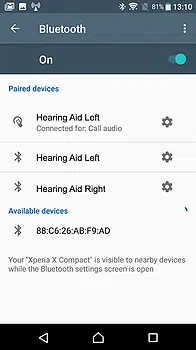
- Ensure Bluetooth if turned ON
- In the settings menu, tap on the Bluetooth icon
- Tap on the slider button to turn Bluetooth on
- In the settings menu, tap on the Bluetooth icon
- Tap on the slider button to turn Bluetooth on
- Turn on Hearing Aids by either closing the battery door(s) or removing from charger
- You will now see a message, “Available Devices”
- Select on your named Hearing Devices in the list of found devices
- A connection beep will be heard in the paired hearing aid
- *** You are now connected for Streaming Function ***
- Open your App for your hearing aids to ensure devices are connected successfully.
- Opening the battery door(s)
- Placing on the charger
- Tap on “Settings”
- In the settings menu, tap on the Bluetooth icon
- Tap on the slider button to turn Bluetooth on